This article contains Amazon affiliate links. As an Amazon Associate we earn from qualifying purchases.
In short :
- Measure your TV’s actual width first, then pick a stand at least 10 to 15 cm wider so it looks balanced and stays stable.
- Match the stand’s shape to your room layout, and consider a corner model if space is tight.
- Get the height right so you’re not craning your neck every movie night.
- Choose open shelves for gear that needs airflow and closed storage to hide the clutter.
- Nail those three checks and you avoid the overhang, the neck strain and the cable mess.
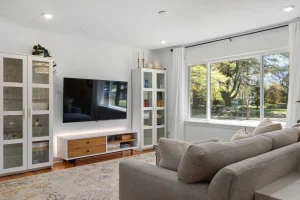
A television is only half the equation. The stand beneath it decides whether your living room feels calm and intentional or crowded and chaotic. Pick the wrong size and your screen looks like it’s floating on a doll’s dresser; pick the wrong height and you’ll spend every movie night craning your neck. Choosing a TV stand isn’t about finding the flashiest piece — it’s about matching three things: the screen, the room, and the way you actually live. Get those aligned and everything else falls into place.
This guide walks you through the practical decisions that matter most: measuring for the right width and height, choosing a shape that suits your layout, and weighing open versus closed storage. You’ll find concrete rules you can apply the moment you get home with a tape measure.
Start With the Screen, Not the Furniture
The single most common mistake is falling in love with a stand before checking whether the TV actually fits on it. A stand should always be wider than the television — ideally by a comfortable margin on each side. As a working rule, look for a surface at least 10 to 15 cm wider than your screen’s total width. That extra breathing room keeps the setup looking balanced and reduces the risk of a knock sending the TV over the edge.
Screen size is measured diagonally, but the number you need for the stand is the full width of the chassis. A 55-inch television, for example, is typically around 123 cm wide — so a stand in the 135–145 cm range gives you a stable, proportionate base. This is exactly why so many people hunting for a 55-inch setup end up searching for stands sized specifically for that class of screen; the width figure is what drives the purchase, not the diagonal.
Two more measurements to note before you shop:
- Weight capacity. Check the stand’s rated load and leave a safety margin. A large screen can weigh considerably more than people expect.
- VESA and mounting. If you plan to use a bracket or a swivel mount rather than resting the TV on its own feet, confirm the stand supports it.
Here’s a real-world scenario: someone measures their wall, buys a stand that’s 120 cm wide, then discovers their 55-inch TV overhangs on both sides. It looks unstable and it is. Ten minutes with a tape measure before buying prevents the whole problem.
Quick sizing reference
| Screen size | Typical TV width | Suggested stand width |
|---|---|---|
| 43–50 inch | ~95–112 cm | 110–125 cm |
| 55 inch | ~123 cm | 135–145 cm |
| 65 inch | ~145 cm | 155–165 cm |
| 75 inch and up | ~167 cm+ | 180 cm+ |
Match the Stand to Your Room’s Shape
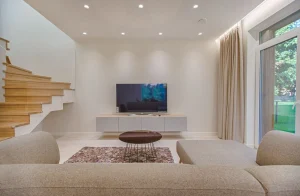
Where the stand goes matters as much as what it holds. A long, low unit suits a wide wall behind a sofa; a compact corner piece rescues a tight room where a full-width stand would block a doorway or pinch a walkway.
Corner TV stands are a smart answer for small living rooms and bedrooms. They tuck into the angle, free up floor space, and often come with a swivel so you can angle the screen toward the seating. If your room has an awkward alcove or a diagonal wall, a corner unit can turn dead space into the focal point. Just check that the corner you have in mind has enough depth — some angled stands are surprisingly deep.
For open-plan spaces, a low, wide stand acts as a natural divider between living and dining zones without building a wall. And in a narrow room, a tall, slim unit with vertical storage keeps the footprint small while still holding the essentials.
Modern designs tend to favour clean lines, floating tops and minimal hardware — a look that suits contemporary interiors and keeps cables easy to manage. If your decor leans traditional, a warmer wood finish or a panelled front will sit more comfortably. The goal is harmony, not a showpiece that fights the rest of the room.
A practical placement check
Before committing, stand where you’ll actually sit and look at the wall. Is the stand centred on the viewing position? Does it leave room for a lamp or a plant beside it? A quick walk-through of the sightlines saves you from a piece that looks great in the shop but awkward at home.
Height, Storage and Cable Management
Comfort starts with height. The centre of the screen should sit roughly at eye level when you’re seated — a little higher is fine if you recline, a little lower if you sit upright. A stand that’s too tall forces you to look up; too low and you slump. Most people are well served by a stand around 40–55 cm high, but measure your own sofa and eye line rather than guessing.
Storage is where lifestyle comes in. Open shelving keeps media players, consoles and speakers ventilated and easy to reach. Closed cabinets hide clutter but can trap heat, so leave gaps if you’re housing electronics that run warm. A mix works well: open space for the devices you use daily, closed doors for everything else.
Don’t overlook cable management. A stand with a back panel, cut-outs or a built-in channel keeps wires tidy and out of reach of pets and toddlers. In a household with a crawling baby, that’s not a nicety — it’s a safety feature. Look for a design that lets you route cables down the back and out of sight.
Real-world example
Picture a family room with a games console, a soundbar and a streaming box. An open-shelf stand with a rear cut-out lets all three breathe and keeps the wiring contained. Swap in a fully closed cabinet with no ventilation and the console runs hot, the remotes go missing, and the whole setup becomes a daily annoyance.
FAQ
How wide should a TV stand be compared to the TV?
Aim for a stand at least 10–15 cm wider than the television on each side. This gives stability and a balanced look. If you’re mounting the TV on a bracket instead of resting it on its feet, the stand mainly needs to support the bracket and hold your equipment.
Are corner TV stands a good choice for small rooms?
Yes — they’re one of the best space-saving options. They use an otherwise dead corner, free up floor space and often swivel to improve viewing angles. Just confirm the corner has enough depth and that the stand doesn’t block a door or walkway.
Should I choose open shelves or a closed cabinet?
Open shelves suit devices that need airflow and frequent access; closed cabinets hide clutter but can trap heat. Many people combine both — open space for daily-use electronics, closed storage for everything else. Whatever you pick, make sure cables can be routed neatly.
The Bottom Line
Choosing the right TV stand comes down to three checks: measure the screen’s width and add breathing room, match the shape to your room’s layout, and pick a height and storage style that fit how you live. Do those three things and you’ll avoid the overhang, the neck strain and the cable spaghetti that plague so many living rooms.
For a deeper look at materials, finishes, assembly tips and long-term care, the full guide on choosing and living with TV furniture covers everything in more detail — start here for the essentials, then go deeper when you’re ready.
To make your choice concrete : Televisions stands: how to choose the right model
Was this guide helpful?
Share your experience with the WiseHomeGuides community.